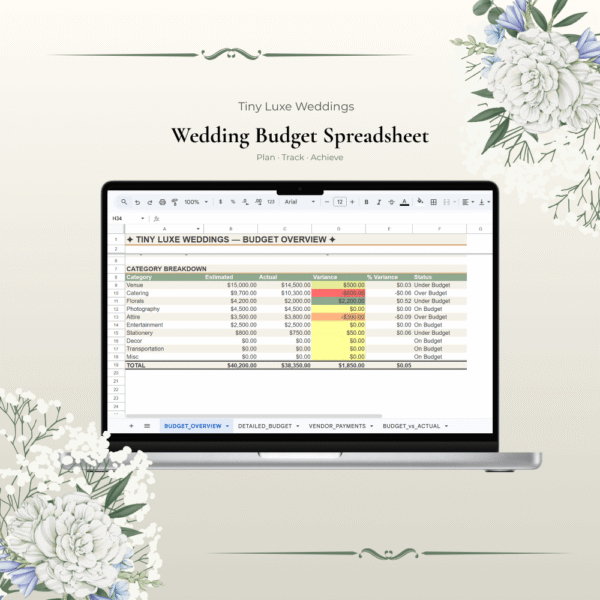
Manage Your Wedding Budget Like a Pro
Planning a wedding means juggling dozens of vendors and hundreds of line items. Without a solid system, costs spiral out of control fast. This comprehensive Wedding Budget Spreadsheet puts you in complete command of your finances from day one.
What’s Included:
4 Professional Tabs:
- Budget Overview Dashboard — See your total budget, spending, remaining balance, and budget status at a glance
- Detailed Budget — Line-by-line itemization of every vendor and expense category
- Vendor Payments Tracker — Track deposits, balances, final payments, and payment dates for all vendors
- Budget vs. Actual — Compare your estimates to actual spending and identify where you’re over/under budget
Smart Features:
- Auto-calculating formulas (no manual math required)
- 15+ expense categories (Venue, Catering, Florals, Photography, Attire, Entertainment, etc.)
- Real-time budget variance analysis
- Professional EUR currency formatting
- Example data from a luxury French wedding (€50k+) so you can see how it works
Perfect For:
- Couples with any budget (€5,000 – €100,000+)
- Visual people who need to see numbers in real-time
- Anyone who gets anxious about overspending
- Couples managing contributions from multiple family members
How to Use:
- Download the spreadsheet (Excel .xlsx format)
- Enter your total budget in the Budget Overview tab
- Add your vendors and estimated costs
- Track actual spending as you go
- Watch your budget variance update automatically
- Share with your partner for transparency
What Customers Love:
- “Finally feel in control of my spending”
- “So much easier than tracking everything in my head”
- “The dashboard makes it crystal clear where money is going”
- “Already saved money by catching overspending early”
Format: Excel spreadsheet (.xlsx) Compatible: Microsoft Excel, Google Sheets, Numbers Download: Instant digital download